
Inquiry about the services
-
q.Where can I search and obtain satellite imagery?
-
a.
Please see the following page for details.
-
q.What is the unit of ALOS-2 data?
-
a.
We provide each satellite product in units of "scenes".
-
q.Where can I contact if I want to utilize ALOS-2 data?
-
a.
Please see the following link.
-
q.What is the credit notation of ALOS-2 data.
-
a.
When using ALOS-2 data for distribution, etc., please describe the copyright below.
Standard Data
About copyright Copyright: JAXA ©JAXA:ALL RIGHTS RESERVED ©JAXA About data distribution Distributed by PASCO CORPORATION
-
q.Where can I get the order materials?
-
a.
Please access the "Earth Observation Data Utilization Promotion Platform" (hereinafter referred to as Platform), search the order history and go to the order detail page.You can download a series of materials from the button of Official Quotation, Sales Confirmation, Delivery Note and Invoice.
-
q.How long does it take to deliver the ALOS-2 data?
-
a.
Please see the remarks column on the following pages for the delivery time of archived data and tasking order .
-
q.Where can I search and order ALOS-4 data?
-
a.
ALOS-4 data can be searched and ordered on "Earth Observation Data Utilization Promotion Platform".For Spotlight mode, please search through JAXA's AUIG-4 and place your order using the order sheet.
-
q.Is it possible to conduct new acquisition with ALOS-4?
-
a.
No, ALOS-4 data is available for archive sales only.If you would like to request new acquisition, please place an order using ALOS-2.
-
q.I can not place an order on "Earth Observation Data Utilization Promotion Platform" (hereinafter referred to as Platform) for the data I searched on AUIG-4.
-
a.
On Platform, you can search for and order only PRF-fixed data.If you would like to order variable‑PRF data, please contact us at order@alos-pasco.com.
-
q.I searched for variable‑PRF data on AUIG‑4 and ordered it using the order sheet. However, delivered data contains a large amount of noise and cannot be used for analysis.Can I return it or exchange it for different data?
-
a.
For variable PRF data, it cannot be returned or exchanged even if it contains noise. Please review the data specifications and the related notes carefully before purchase.
■《Important》Notice on ALOS-4 Archive Data
■PALSAR-3 Standard Product Information(Ver Dec. 2025)
Inquiry about the satellite specs
-
q.Where can I see the accuracy of ALOS-2?
-
a.
EORC (Earth Observation Research Center) is regularly conducting the calibration and validation of the PALSAR-2 and its standard products using the data over the calibration sites in the world. Please see the following site for the calibration result.
-
q.Where can I see when ALOS-2 will observe the data over AOI?
-
a.
Please see following site for observation date.
In addition, you can download the KML, Shape files and range map of basic observation scenario.
-
q.Where can I see the backscattering coefficient correction value (calibration factor) of ALOS-2?
-
a.
Please see following site for backscattering coefficient correction value.
Inquiry about the products
-
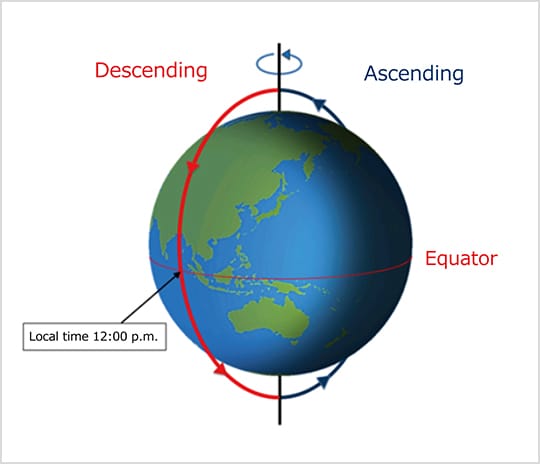
q.What are the selective satellite travel direction, ascending and descending when I search the imagery of ALOS-2 data?
-
a.
Ascending (ascending orbit) refers to the orbit of the satellite from south to north, and descending (descending orbit) refers to the orbit of the satellite going from north to south.

-
q.Where can I see the processing level of ALOS-2 imagery?
-
a.
Please see the following site for the processing level of ALOS-2 imagery.
-
q.Where can I confirm the information about observation date & time and product processing conditions of ALOS-2 imagery?
-
a.
You can confirm metadata with the summary file (summary.txt) stored in the products.
-
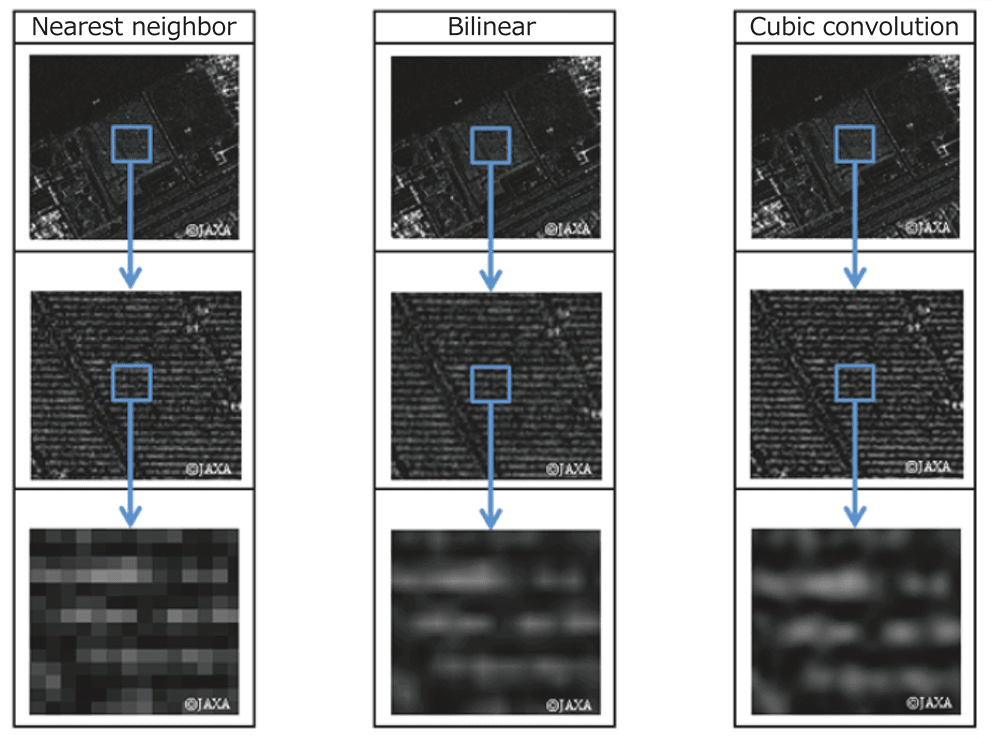
q.What is the meaning of resampling method and what are the types?
-
a.
Meaning
Resampling (rearrangement) generates an intermediate color between the original pixels when performing operations such as enlarging, reducing, rotating, transforming, and changing the resolution of an image.
Types
The table below shows the resampling methods for ALOS-2.
In addition, you can set parameters at levels 1.5 / 2.1.Types Description Pros Cons NN:
Nearest neighbor methodSuitable for image analysis because high-speed display is possible and pixel values are used as they are. The pixel values of the original image are preserved Lack of smoothness BL:
Bilinear methodSuitable for images that change almost continuously, such as terrain Smooth imagery is obtainable Unable to maintain pixel values in the original image CC:
Cubic
Convolution methodSuitable for image interpretation because it produces clear images. Obtainable averaged images Unable to maintain pixel values in the original image
-
q.Which types of map projection can I select?
-
a.
The map projection types you can select are as follows.
- ALOS-2/PALSAR-2 and ALOS-4/PALSAR-3:Enable to set with Level 1.5/2.1
-
U:UTM(Universal Transverse Mercator)
P:PS(Polar Stereo)
M:MER(Mercator)*Not applicable to ALOS-2 Level 1.5 products
-
q.Which DEM is used for Level 2.1 ortho processing of ALOS-2 and ALOS-4 images?
-
a.
- ALOS-2
- The available DEM options are AW3D30 and GISMAP Terrain. Coverage: AW3D30:Global land areas within approximately ±82° latitude GISMAP Terrain: Japan only
- ALOS-4
- The available DEM options are AW3D30, GISMAP and SRTM. Coverage: AW3D30:Global land areas within approximately ±82° latitude GISMAP:Japan only SRTM:Global coverage between 60°N and 56°S latitudes
-
q.What is the relationship between the scene shift direction and the values (plus and minus values)?
-
a.
The Scene Shift parameter can be specified in 10 incremental levels. Since the observation length varies depending on the observation mode, the ground distance corresponding to each shift level also differs.
- Shift Values and Corresponding Distances
-
・Stripmap Mode
Shift value : -5 to +4
Ground distance per shift value of "1" : Approximately 5.6 km
・ScanSAR Mode
Shift value : -25 to +20
Ground distance per shift value of "1" : Approximately 28 km - Shift Direction
-
・Ascending
Shift to minus direction = Move to South direction
Shift to plus direction = Move to North direction
・Descending
Shift to minus direction = Move to North direction
Shift to plus direction = Move to South direction
For further details regarding scene shift settings, please also refer to this page.
-
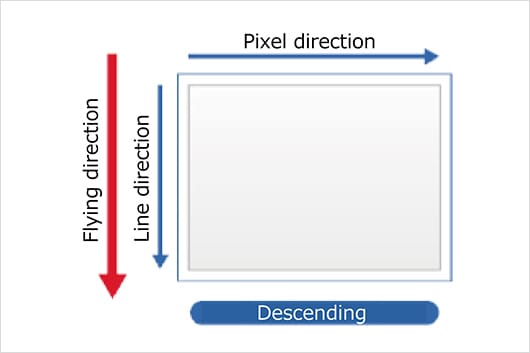
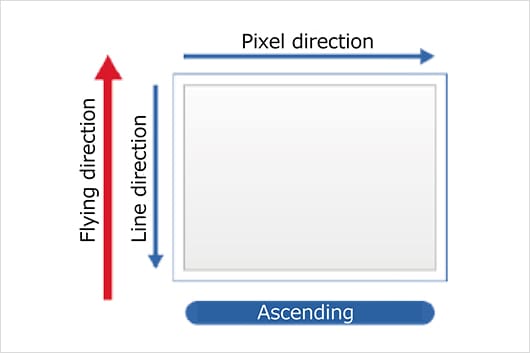
q.What is the difference between Geo-reference and Geo-coded?
-
a.
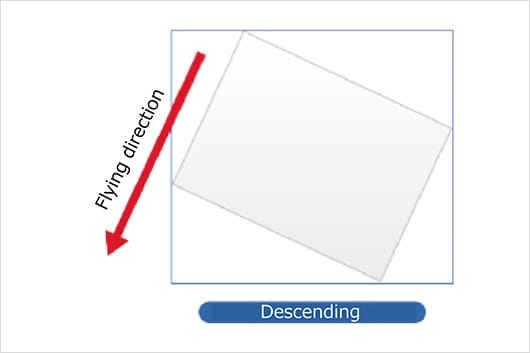
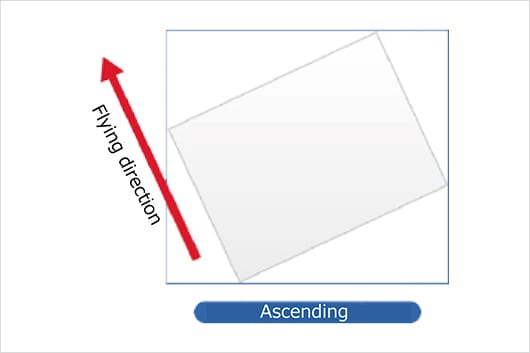
Geo-reference image
Map projection based on the satellite travel direction.
Geo-coded image
Projected based on the direction on the map.
-
-
q.Which processing level of imagery is orthorectified?
-
a.
Level 1.1/1.5 imageries are not orthorectified.When observing an area with a high altitude, geographical misalignment due to topographical distortion may increase.
-
q.What is the difference in the orbit accuracy selected when ordering ALOS-2 images?
-
a.
Orbit accuracy affects the position accuracy. When ordering images, you can choose from the following two options.For [Defined Orbit Ephemeris], images are generated based on the exact position of satellite calculated using GPS several days after observation.For [Available Best Accurate], the onboard ephemeris is applied. In this case, satellite positions are approximate and may differ from image using [Defined Orbit Ephemeris]. Please select this option for immediate delivery. After fixing the orbit, the confirmed ephemeris will be applied regardless of which option is selected. This will be the most accurate one.
-
q.How do we order ScanSAR mode archived images of ALOS-2/PALSAR-2?
-
a.
The data are available for download through JAXA's G-Portal. Please note the order is not accepted by Platform purchase orders.
-
q.Where can we download the sample data of ALOS-2?
-
a.
Please download from JAXA's website below. You can retrieve various processing levels of data in CEOS or GeoTIFF formats for your evaluation.
-
q.Where can we obtain ALOS-4 sample data?
-
a.
For customers purchasing ALOS-4 data for the first time, sample data can be ordered free of charge up to 10 scenes. Orders can be placed on "Earth Observation Data Utilization Promotion Platform". (For sample data with Spotlight mode, please contact us at order@alos-pasco.com).
Additionally, sample data is available on JAXA's official website, so please use it as well.
-
q.Is it possible to perform interferometric analysis by combining ALOS-2 and ALOS-4 data?
-
a.
Interferometric SAR (InSAR) analysis is possible.Since ALOS‑4 operates in the same orbit as ALOS‑2, it is possible to perform InSAR analysis by combining data from the two satellites.However, please note that if the ALOS‑4 data includes blind areas, those areas cannot be observed and will therefore be non‑interferometric.In addition, please kindly note in advance that ScanSAR data cannot be used for InSAR analysis between ALOS‑2 and ALOS‑4.
-
q.What is the "blind"?
-
a.
It means the "unobservable areas" within the observed data.In data observed with PRF-fixed, unobservable areas of approximately 10% to 20% may be contained within the observation swath.The blind areas that appear in the data are published as "blind maps" for both domestic and overseas regions.
For details, please refer to the official JAXA website below.*Please note that the blind maps are based on nominal values and may not perfectly match the areas in the actual observed data.■PALSAR-3 PRF Fixed Observation Mode Blind Map
For observation data within Japan, you can also check the presence or absence of blind areas using the browse images on "Earth Observation Data Utilization Promotion Platform".
However, please kindly note in adcvence that some browse images may not be displayed.
-
q.If the data with a blind area, can the region without blind area be used for analysis?
-
a.
Even for the data "with blinds," the regions outside the blind area can still be used for analysis.However, if your AOI is located near the blind area, it may be affected, so please take note as a precaution.Please also refer to the document published by JAXA for further information.
-
q.I purchased data that was displayed as "Blind: No information"on on the "Earth Observation Data Utilization Promotion Platform", but it actually contained blind area. Can I return it or exchange it for different data?
-
a.
Data marked as "Blind: No Information" contains data that does not contain the information necessary to determine whether or not there are any unobservable area (blind). For observations outside Japan, it is not possible to confirm the presence or absence of blind area before purchase, as the required information is unavailable. Please also note that if any inconvenience occurs in data usage or analysis due to scene quality or defects, we are unable to provide returns, refunds, or exchanges. We kindly ask that you review the data specifications and the following notes carefully before purchase.
■《Important》Notice on ALOS-4 Archive Data
■PALSAR-3 Standard Product Information(Ver Dec. 2025)
-
q.What is the "Radio Frequency Interference noise removal"?
-
a.
"Radio Frequency Interference noise removal" is a process that identifies abnormally strong signals as interference waves and removes them from the spectrum of the observed signal.
-
q.What are the "Range Antenna Pattern correction" and "Azimuth Antenna Pattern correction"?
-
a.
"Range antenna pattern correction" is a process that corrects brightness differences and phase differences that occur in the range direction due to the antenna pattern.It is applicable to data in all observation modes."Azimuth antenna pattern correction" is a process that corrects brightness differences that occur in the azimuth direction due to the antenna pattern. It is applicable to burst processing data in ScanSAR observation mode only.
-
q.What are "CC4" and "CC6" in resampling methods?
-
a.
CC4 uses the cubic convolution method (third-order convolution interpolation) to perform resampling by referencing a surrounding 4×4 grid (16 pixels).CC6 applies the same method but uses a 6×6 grid (36 pixels). CC6 has higher interpolation accuracy than CC4, but the data size is correspondingly larger.
-
q.What is the "Output polarization"?
-
a.
For ALOS-4 data, you can specify whether to output image files for each polarization.Please select your preferred polarization files when you order.
-
q.What is the "Inter-polarization calibration"?
-
a.
"Inter-polarization calibration" is a process that corrects errors that occur between the acquired polarization channels (HH, HV, VH, VV).It adjusts gain differences and phase offsets between polarizations, as well as corrects crosstalk (signal leakage between channels).